Written by Wilmer Gaona
In today’s educational ecosystem, the STEAM (Science, Technology, Engineering, Arts, and Mathematics) methodology seeks to transform students from passive consumers into builders of their own knowledge. One of the most powerful and accessible tools to achieve this transition is Inkscape, an open-source, free, and cross-platform vector design software. It offers advanced features comparable to commercial software, making it a top choice for digital fabrication laboratories (FabLabs) and classrooms where digital design is practised.
Why Inkscape in the Classroom?
Unlike bitmap images (such as photos), Inkscape works with vectors. This means shapes are defined by mathematical equations, allowing designs to be scaled without losing resolution, regardless of the original size. Furthermore, it allows for exporting designs into digital cutting files for machines like laser or vinyl cutters. For an educator, this is vital: what the student draws on the screen is exactly what the laser cutter will interpret as a cutting path.
Key Educational Features:
- Bitmap Tracing: Allows for converting or tracing silhouettes into clean vectors.
- Boolean Operations: Union, difference, and intersection of shapes; these are fundamental operations for creating interlocking assemblies.
- Layer and Colour Management: Crucial for differentiating between cutting lines and marking or engraving lines.
Success Case: The Personalised Sports Hanger
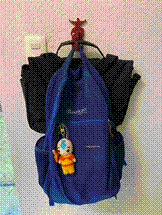
To illustrate the potential of this tool, we analysed a project developed with 10th-grade students: the creation of a hanger with enough strength to hold a school backpack. A core requirement was that each student had to choose a silhouette of a person practising a sport to be added to the base of the hanger. This exercise teaches not only design but also digital manufacturing and basic ergonomics.
As a first step, I looked for existing hanger designs for inspiration and found one on Etsy (link: https://www.etsy.com/listing/1126570572/wall-hook-laser-cutter-svg-file).

However, the main drawback was that it was not customizable. Therefore, I decided to design my own version, modifying the hook where the backpacks are held, enlarging the tabs and slots, adding holes for wall mounting, and adapting the design so each student could personalise it.
1. The Structural Design Challenge
The challenge consisted of manufacturing a hanger capable of supporting the weight of a school backpack using 5mm MDF. The technical solution was the double-cut: designing each piece in duplicate and joining them together, achieving a final thickness of 10mm. This introduces students to the concept of lamination to improve mechanical strength.

2. Assembly and Hardware
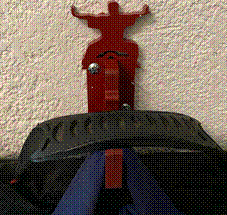
The design integrates a tab and slot system. In Inkscape, students can design and verify that the pieces fit perfectly. Additionally, a reinforcement element was incorporated: a metal bolt 3/16″ in diameter by 1″ long to add strength to the model.

3. Personalisation: The Motivating Factor
The distinguishing feature was identity. Each student chose a silhouette of a sport or discipline—such as tennis, karate, ballet, soccer, football—and integrated it into the wall base. Here, Inkscape facilitated the combination of the functional geometry of the support with the organic aesthetics of the human silhouette, demonstrating that technique and art go hand in hand.

4. Final Result
The following images show the expected final result of one of the hangers:

Advantages of this Approach
- Low Cost: Inkscape is free, removing the cost barrier of technology tools. Furthermore, MDF is generally an affordable material that is easy to work with.
- Critical Thinking: The student must foresee how a 2D design will become a functional 3D object.
- Sustainability: The use of MDF promotes the use of renewable resources.
Conclusion
Projects like the personalised hanger demonstrate that digital fabrication is not just about “pressing a button”. It is an iterative process where the software is the canvas and the laser cutter is the modern chisel. By teaching Inkscape, we are not just teaching how to draw; we are teaching how to manufacture solutions for the real world.

 COMPUTER SCIENCE REVISION
Leave a comment