Computer Science · Data Representation · Each black pixel = 1 · Each white pixel = 0
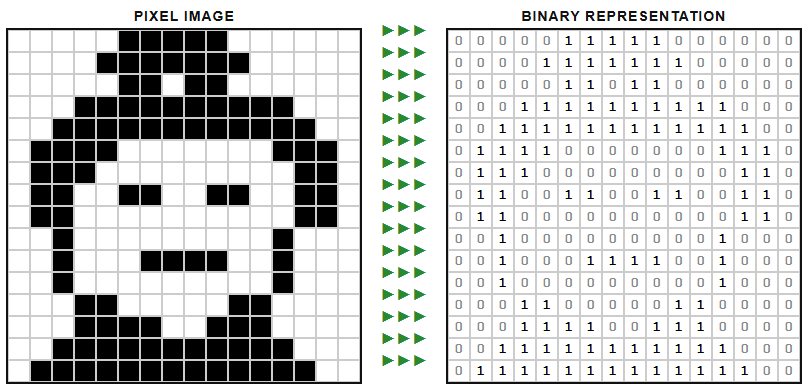
How can you create your own worksheets on Bitmap image representation?
Use the following prompt in claude.ai to create your own exercises!
Prompt: Binary Image Representation Worksheet
Create a printable, self-contained HTML worksheet for teaching binary image representation to Year 8 Computer Science students (age 12–13, UK curriculum).
The layout must closely match the classic bitmap → binary teaching diagram style: a pixel grid on the left, green arrow rows in the middle (one per row), and a binary table on the right, all perfectly row-aligned.
Pixel art specifications:
- Character: [INSERT CHARACTER NAME HERE]
- Grid size: 16×16
- Colour mode: 1-bit black and white only (black = 1, white = 0)
- No grey, no anti-aliasing — sharp blocky pixels only
- Each cell: 22×22px
Worksheet must include:
- A Key box — black = 1, white = 0, grid size, bits per pixel, total bits and bytes
- A How It Works box — plain-English explanation of bitmap storage, row-by-row reading, and metadata
- A Calculate box — file size formula with examples for 1-bit, 2-bit, and 8-bit colour depth
- 8 student tasks in a two-column grid, including: pixel count, bits calculation, bytes conversion, reading a specific row’s binary, colour depth increase, resolution increase, a binary→decimal conversion, and an extension question on metadata
- A Student Activity section with a blank 8×8 pixel art grid and a matching blank 8×8 binary grid side by side, with a file size calculation reminder
- A Print / Save as PDF button (hides on print) and a Download PNG button for the pixel art only
Style:
- Clean, black-and-white academic worksheet aesthetic — suitable for printing on A4
- Section headers in small caps, bordered info boxes, monospace font for binary values
- Green (
#2a8a2a) arrow characters (►►►) between the grids- Footer crediting the character’s creator and noting it is an educational resource
Output a single
.htmlfile with all CSS and JavaScript inline. No external dependencies.
The only thing you need to change each time is the character name on the third line. Everything else will produce the same structure, style, and pedagogical content.
Would you like to add more colours?
Here is the updated prompt for an 8-colour version:
Prompt: Binary Image Representation Worksheet — 8 Colours (3-bit)
Create a printable, self-contained HTML worksheet for teaching binary image representation to Year 8 Computer Science students (age 12–13, UK curriculum).
The layout must closely match the classic bitmap → binary teaching diagram style: a pixel grid on the left, green arrow rows in the middle (one per row), and a binary table on the right, all perfectly row-aligned.
Pixel art specifications:
- Character: [INSERT CHARACTER NAME HERE]
- Grid size: 16×16
- Colour mode: 3-bit, exactly 8 colours — define a palette of 8 solid, flat colours appropriate to the character (e.g. skin tone, hair, clothing colours, background). Assign each colour a 3-bit binary code from
000to111- No gradients, no anti-aliasing — sharp blocky pixels only
- Each cell: 22×22px, filled with its palette colour
- The binary table on the right shows the 3-bit code for each pixel (e.g.
011), displayed in a small monospace font inside each cell, with a subtle background tint matching its colourWorksheet must include:
- A Colour Palette Key table — showing a colour swatch, colour name, hex value, and 3-bit binary code for each of the 8 colours
- A How It Works box — plain-English explanation of how each pixel is now stored as 3 bits, how the computer reads the grid row by row, and what metadata is stored
- A Calculate box — file size formula: 16 × 16 × 3 bits = 768 bits = 96 bytes, plus comparison to 1-bit (32 bytes) and 8-bit/256 colours (512 bytes) versions of the same image
- 8 student tasks in a two-column grid, including: pixel count, bits-per-pixel for 8 colours, total bits and bytes, reading a specific row’s binary codes, what happens to file size if colours increase to 16, resolution doubles to 32×32, a binary→decimal conversion using one of the palette codes, and an extension question on compression or metadata
- A Student Activity section with a blank 8×8 pixel art grid (students shade or colour cells) and a matching blank 8×8 binary grid (students write 3-bit codes), side by side, with a file size calculation reminder (8 × 8 × 3 = 192 bits = 24 bytes)
- A Print / Save as PDF button (hides on print) and a Download PNG button for the pixel art only
Style:
- Clean, black-and-white printable academic worksheet aesthetic — suitable for A4
- Section headers in small caps, bordered info boxes, monospace font for binary values
- Green (
#2a8a2a) arrow characters (►►►) between the grids- The binary table cells should have a very light background tint of their corresponding palette colour so the mapping is visually intuitive, with the 3-bit code in dark text
- Footer crediting the character’s creator and noting it is an educational resource
Output a single
.htmlfile with all CSS and JavaScript inline. No external dependencies.


