How does a computer turn a photograph into millions of 1s and 0s? Let’s find out — one pixel at a time.
What is a pixel?
A pixel — short for picture element — is the smallest unit of a digital image. Each pixel stores a single colour. When you zoom in far enough on any digital image, you can see that it is really just a grid of coloured squares.
Computers do not understand colour the way humans do. They only understand binary — 1s and 0s. So every pixel’s colour must be converted into binary numbers. The result is called a bitmap image.
Zoom in on a digital image — each square is one pixel
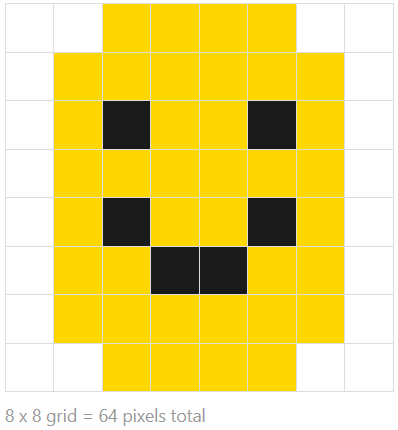
Storing a Black & White Image in Binary
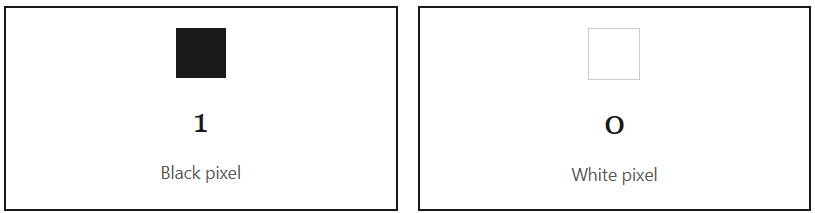
In a simple 1-bit (black and white) bitmap image, each pixel is stored as a single binary digit:
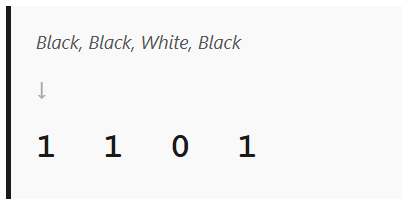
Each row of pixels becomes a row of binary. For example:
When all rows are combined together, they form the complete image stored in binary. That is how a computer stores and recreates a bitmap image.
bUILDING A 5 X 5 BITMAP IMAGE
You are given a grid with 5 rows. Each row has a 5 binary values. See below:
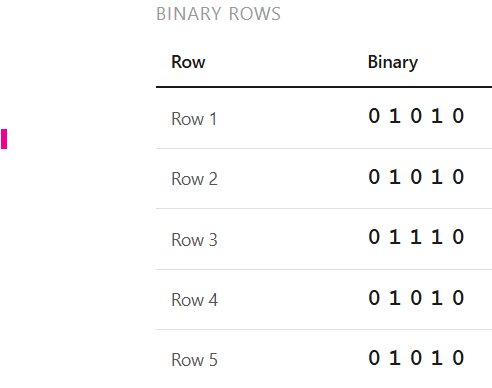
Now, you are going to build your image filling the pixels of your grid with black when you see a 1, and with white when you see a zero.
This will be the end result:
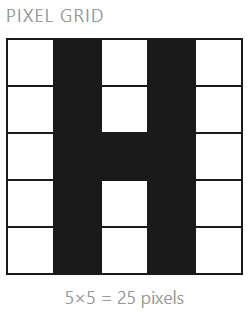
Now, we can do the same adding more colours. But first, we are going to learn about Colour Depth.
Colour Depth
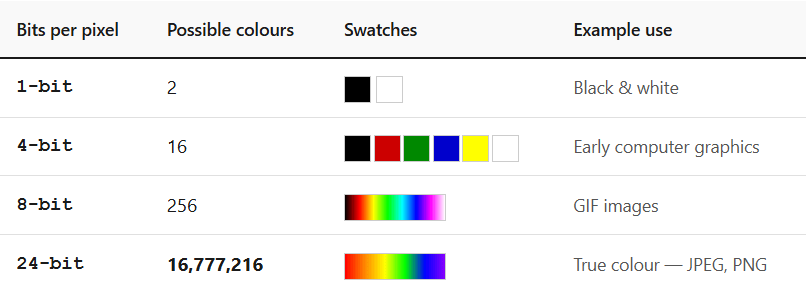
The number of bits per pixel determines how many different colours can be stored. This is called colour depth. The formula is:
Number of colours = 2n (where n = bits per pixel)
Calculating Image File Size
The uncompressed file size of a bitmap depends on three things: the width in pixels, the height in pixels, and the colour depth in bits per pixel.
File size (bits) = Width × Height × Colour depth
Divide by 8 for bytes · divide by 1,024 for KB · divide by 1,024 again for MB
Worked example
A 640 × 480 image with 24-bit colour depth:
640 × 480 × 24 = 7,372,800 bits
÷ 8 = 921,600 bytes
÷ 1,024 ≈ 0.88 MB
This is before any compression — JPEG/PNG reduce this significantly.
Key Terms
| Pixel | The smallest unit of a digital image. Stores a single colour value. |
| Bitmap | An image format where every pixel is mapped to binary data arranged in a grid. |
| Colour Depth | The number of bits used to represent one pixel. More bits = more possible colours. |
| Resolution | The total number of pixels in an image (width × height). Higher resolution = more detail = larger file. |
| True Colour | 24-bit colour depth — 8 bits each for Red, Green, and Blue — giving over 16 million colours. |
| Metadata | Extra data stored alongside an image: width, height, colour depth, creation date, etc. |
Quick Check
Can you answer these questions without looking back?
- What does the word pixel stand for?
- How many colours can a 3-bit colour depth produce?
- An image is 800 × 600 pixels with 8-bit colour depth. What is its uncompressed file size in bytes?
- What is the difference between resolution and colour depth?
- Why do images need to be compressed before being sent or stored online?
Answers:
- 23 = 8 colours
- 800 × 600 × 8 = 3,840,000 bits ÷ 8 = 480,000 bytes
- Resolution is the number of pixels; colour depth is how many bits store each pixel’s colour.
- Uncompressed bitmaps are very large, making storage costly and transmission slow.
#KS3 #KS4 #DataRepresentation #TeamCompSci #Bitmap

 COMPUTER SCIENCE REVISION